

Live eventDecember 8Inside JobMatch: the AI job agent that landed me 3 rolesGet ticket →

AI product · Mac app · Jul to Nov 2026

The best-matched job I found,
I didn't find.

My husband sent me a job I would never have found. Posted in German, at a Swiss bank, in a language I read at B1 at best. I applied and had an interview invite two hours later. That's when it hit me: my problem was never judging which roles fit. It was every role I never saw.

So I built Job Match, an AI job-search agent that reads the job boards for me, throws away the noise and scores what's left against my CV, goals and wins. 13,204 jobs collected. 79 worth my time. 3 roles landed.

Then I tried to sell it, and nobody signed up. This is the story of both.

Role

Solo: Product Designer, Builder, Writer, Marketer

Timeline

Jul to Nov 2026
Web version: 50h+
Mac app: 3 days, 84 iterations

Stack

Python · Claude Code · Swift · Sparkle · Polar · Figma

Platforms

macOS (Apple Silicon) · Local web version

Skills

AI Product Design Prompt & Pipeline Design Design Systems Freemium Strategy Launch & Positioning

Check the App

Problem

I only saw the roles I stumbled onto. Everything else, I never saw.

Decision

Automate the "no": free filters first, a strict AI judge last, and learn from every role I dismiss.

Outcome

13,204 jobs read for me, 79 worth reading, 3 roles landed. Then a Mac app anyone can download.

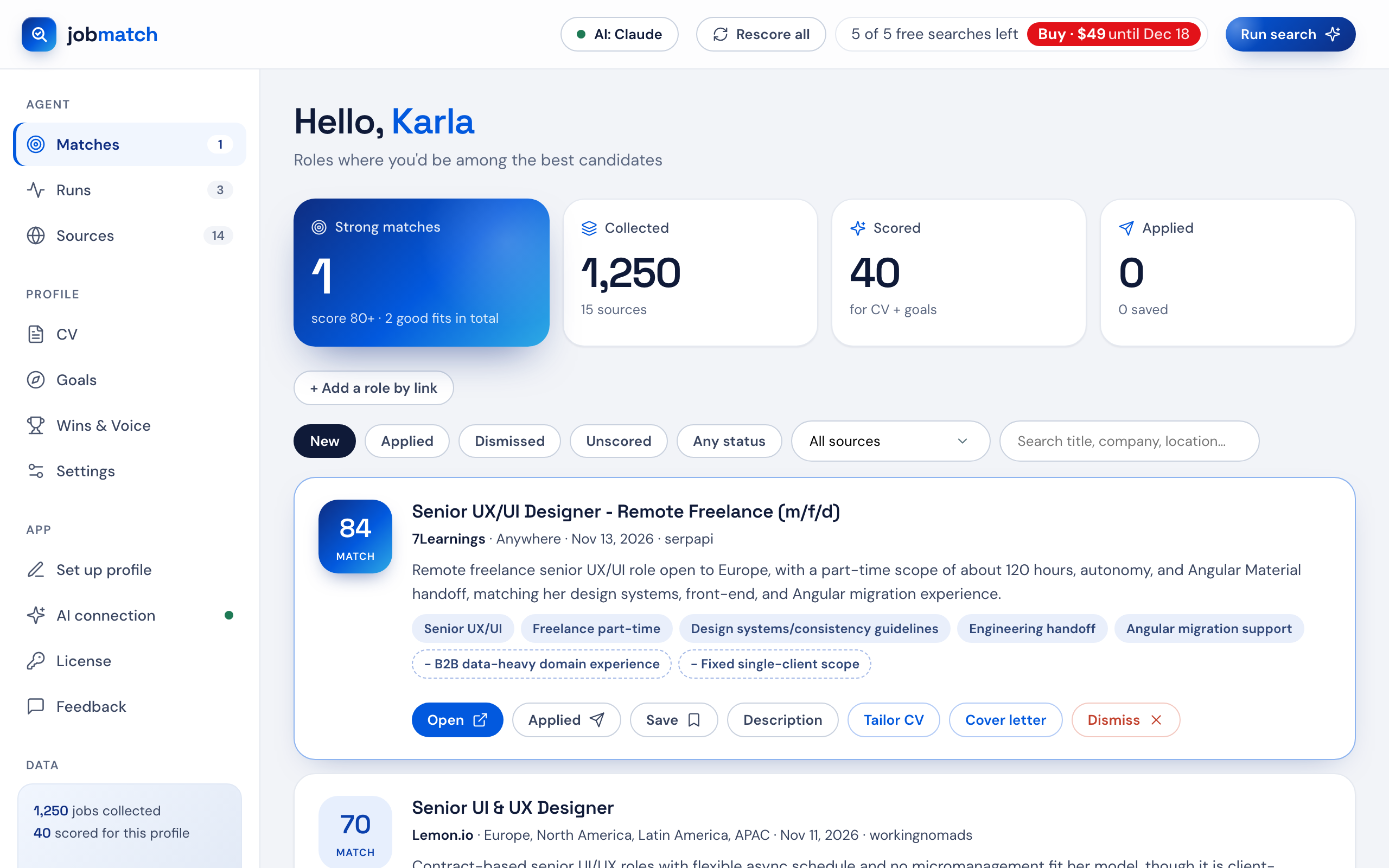
Job Match for Mac, showing the Matches view with scored roles

13,204

Jobs collected
and read for me

79

Matches worth my time
over 99% filtered out

52

Applications
with tailored CVs

3

Roles landed
one found on social media

01 — The Problem

My problem wasn't judging fit.
It was every role I never saw.

The role was Design System and Front-end at a well-known Swiss bank. I wasn't looking. My husband sent it.

I ran it through my AI assistant anyway. Strong match. I applied, and two hours later I had an in-person interview invite.

The interview went well. Then, in the last 30 minutes, the details came out. Switching to Windows after 20 years on Mac. No remote work. An unpaid three-hour daily commute through a six-month probation. I said no.

But on the way home, something clicked. My assistant was good at judging fit (it had been right about this one). It could only judge what I brought it: the roles I stumbled onto, or the ones someone happened to send me.

Everything else, I never saw.
02 — The Insight

Most of a job search is saying no.
So I automated the no.

Think about what a search day really looks like. The same ten job boards. Hundreds of titles that are almost right. Dozens of posts opened only to find "10 years in banking" or "fluent German" in paragraph six.

Most of that time goes into rejecting. Very little goes into the roles that deserve a great application.

So the brief I wrote for myself was one sentence: read the boards for me, throw away the noise, and judge only the jobs that might really fit, the way a strict recruiter who knows my CV would.

Everything else in Job Match supports that sentence.

The Matches view in Job Match

Each role arrives with a score, one sentence on why, the skills that match and what's missing. The decision takes seconds instead of a full read.

03 — The Build

Cheap before expensive.
The AI only sees what survives.

My first version called the AI on everything. It cost me roughly $5 to $10 a day in API fees, and token limits kept cutting runs in half (leaving jobs unscored).

That constraint shaped the whole design. Job Match became a funnel where every step is cheaper than the next.

  1. 1Turn the profile into search wordsAI, once. What to search for, which skills signal a good job, which title words mean "definitely not".AI · once
  2. 2Collect from every sourceFree job board feeds, 1,101 company career pages, and any job I paste by link.no AI
  3. 3Quick sort by keywordsA skill in the title counts a lot, "intern" in the title sinks it.free
  4. 4Glance at titles onlyHundreds at once, to rescue odd wording a keyword missed.cheap AI
  5. 5Read the full post and score itOnly the best 20 per run, against CV, goals and avoid list.careful AI
  6. 6Hide anything under 70Still under Dismissed, never deleted.rule

A typical run now uses fewer than 10 AI requests, on the subscription I already pay for. No extra bill.

I made this decision because the expensive step should only ever see the jobs that earned it.

A generous judge is a useless judge.

"I've built my own AI job search tool, and Karla's JobMatch does things mine doesn't. She is very kind and explains her process clearly. If you're job hunting and don't want to build your own, I'd start with her."
Rok Rupnik Rok RupnikFounding Designer, knitbit.si

My first scoring prompt was polite. Everything came back 75, 80, 85. Every job looked like a match, which means none of them did.

So the prompt became deliberately strict. A score from 0 to 100, where 80+ means "clearly apply", 60 to 79 "plausible" and under 60 "weak". One sentence on why. Matched skills. Gaps. And which of my real past job titles fits best.

Strict is what made the short list worth trusting.

04 — Learning From No

My rejection reasons became
the system's best teacher.

This is the part most people don't notice, and the one I'm proudest of.

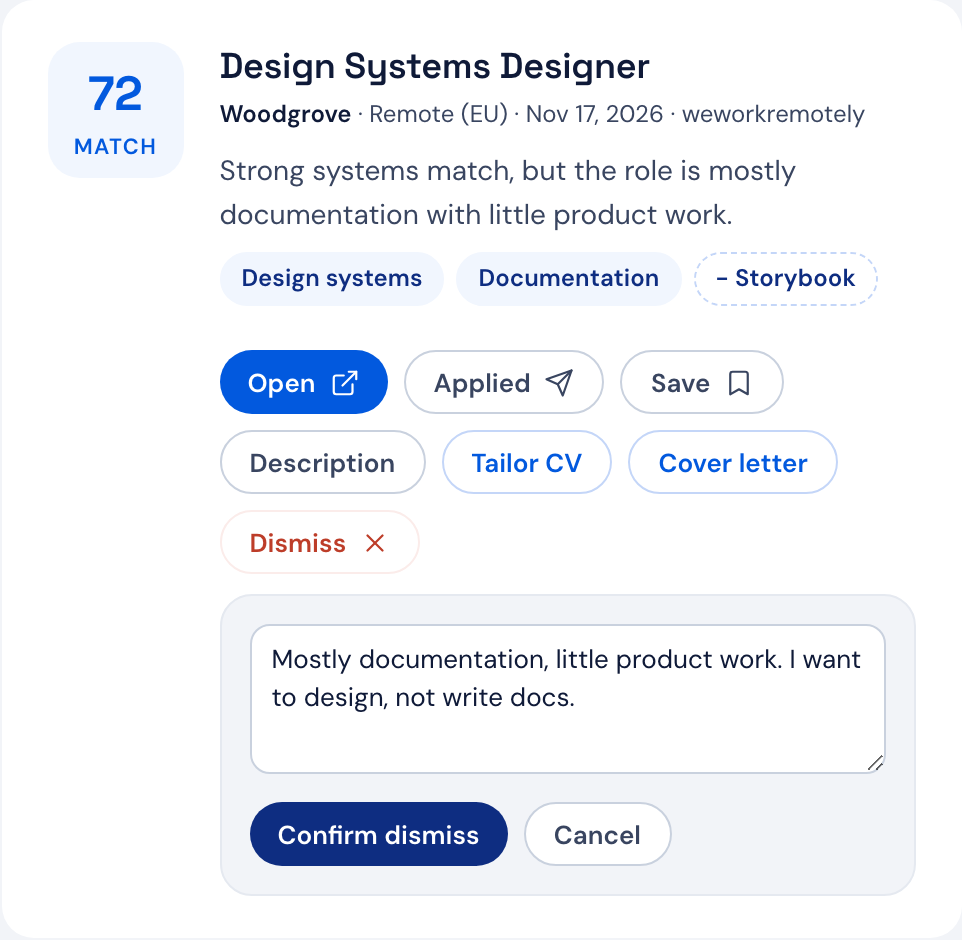
When I dismiss a role, I write why. "Needs fluent German." "It's really a marketing role." "On-site in another country." When I click Dismiss, the AI turns those reasons into short general rules in a file called What to avoid. It merges similar ones and keeps the list short.

From the next search on, those rules feed every step.

So Job Match doesn't just follow what I said I wanted. It learns from what I actually reject. (Turns out those are not always the same thing, right?)

Dismissing a Design Systems Designer role with the reason: mostly documentation, little product work

Dismiss asks for a reason. That one line is what teaches the next search what to skip.

05 — Never Invent

The CV can only say what's true.
Gaps go in a note.

When a role is worth applying to, Job Match writes a tailored CV and cover letter from my long CV, my wins (with real numbers) and a voice file built from cover letters I wrote before AI.

The cover letter follows my own structure: what the role needs, then how I'd help. Not self-praise.

I made this decision because one invented line in a CV costs more than a hundred honest gaps.

The rules are a career coach's rules:

  • Never invent a role, title or number.
  • Find the best proof for each requirement in the post, and say it once.
  • Use the job title I actually held, not the one in the posting.
  • If the post asks for something I don't have, tell me in a note instead of pretending.
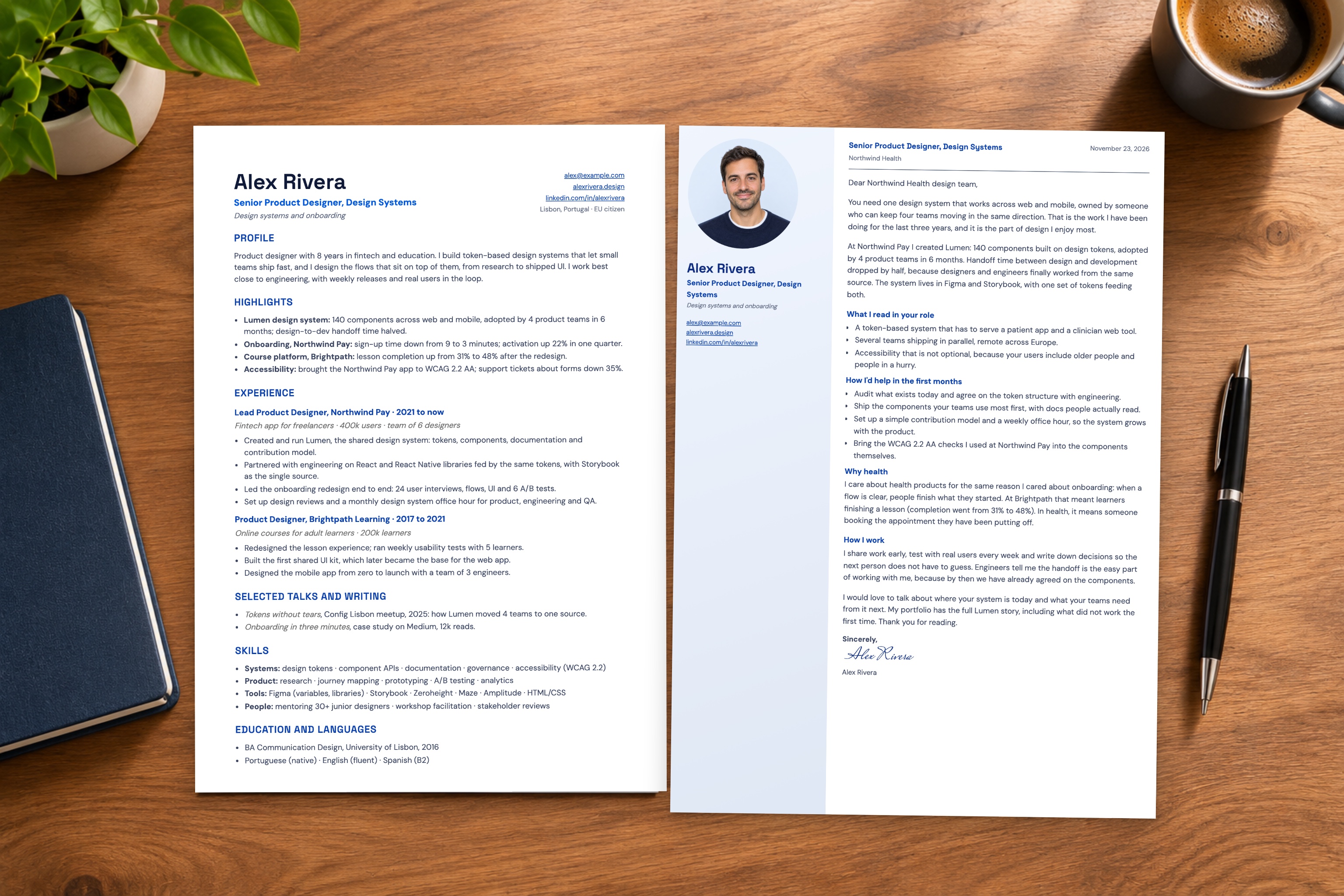
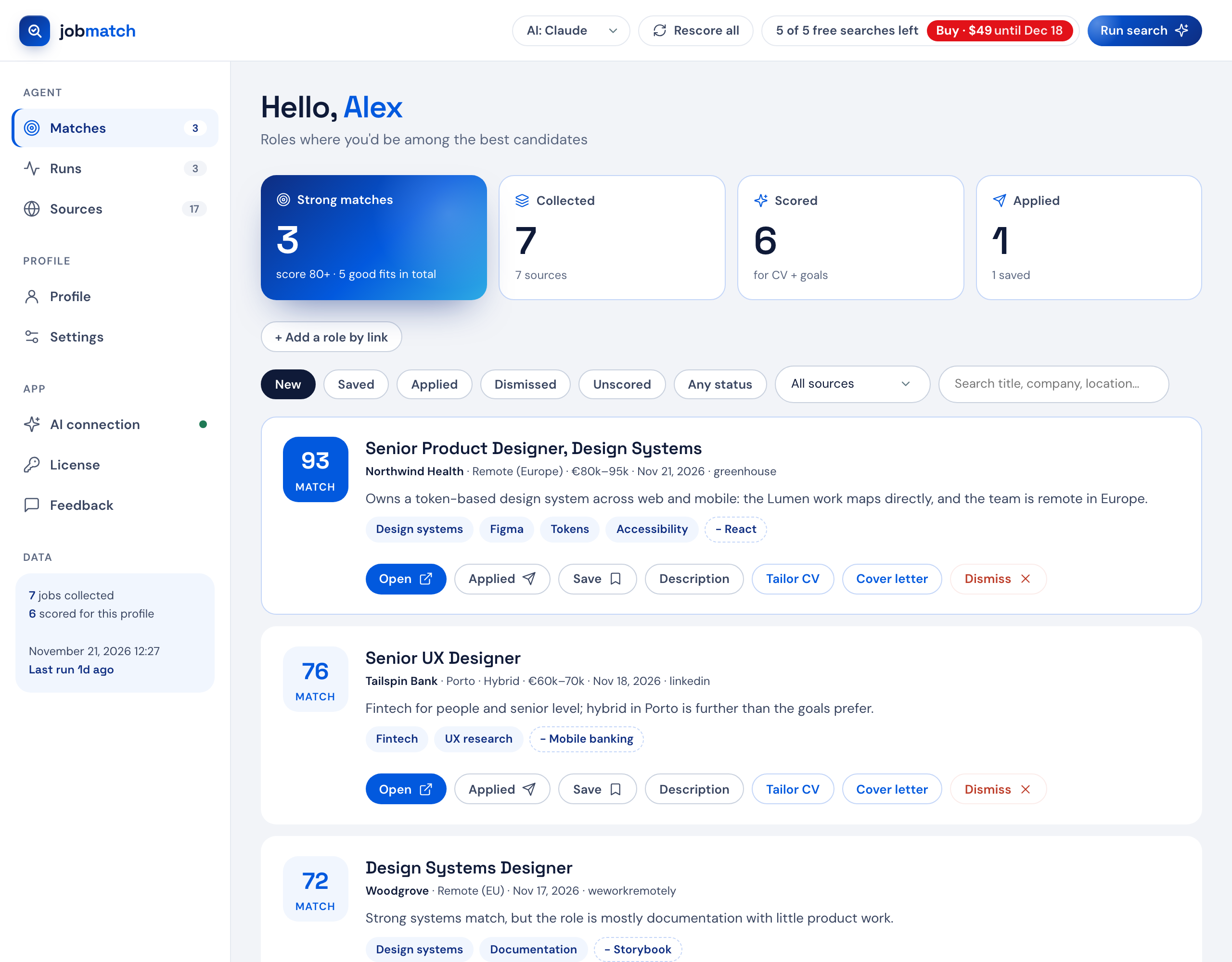
Tailored CV and cover letter for Alex Rivera, a demo profile, printed on a desk

A tailored CV and cover letter for the 93% match, on a demo profile (Alex is made up). Every number comes from Alex's wins file, and the letter opens with what the role needs.

"My assistant was good at judging fit. That was never the problem. It could only judge what I brought it." — Karla Fernandes, on why she built Job Match

06 — The Results

13,204 jobs in.
3 roles out.

I used Job Match every day, improved it every day, and it got me hired three times.

One of the three was a contract role I spotted on social media. I added it by link, it got the same scoring, and I applied with a tailored CV.

And the other 48? 29 companies never answered, not even a no. 18 said no before any interview, and one said no after. That part doesn't change with a better tool. What changes is how much of you it costs.

Someone at the Hub Meet said "13,204 jobs for 3 roles" sounds low. I get it. But I only needed one, and I got three. The point was never volume. It was reading 79 jobs instead of 13,204.

Not bad for a tool I built for myself.

99.4%

Filtered before I read anything

79 of 13,204 reached me

66%

Matches I applied to

52 of 79

8%

Applications that became interviews

4 of 52

56%

Never heard back

29 of 52, not even a no

35%

Rejected without an interview

18 of 52

1

Rejected after an interview

the one that hurts most

3 of 4

Interviews that became roles

one was a contract

1,101

Company career pages tracked

plus free job board feeds

50h+

Build time, web version

with Claude Code

07 — The Launch

6,246 people saw the post.
Zero signed up.

Friends saw Job Match and wanted their own. So I did what felt natural: I taught it.

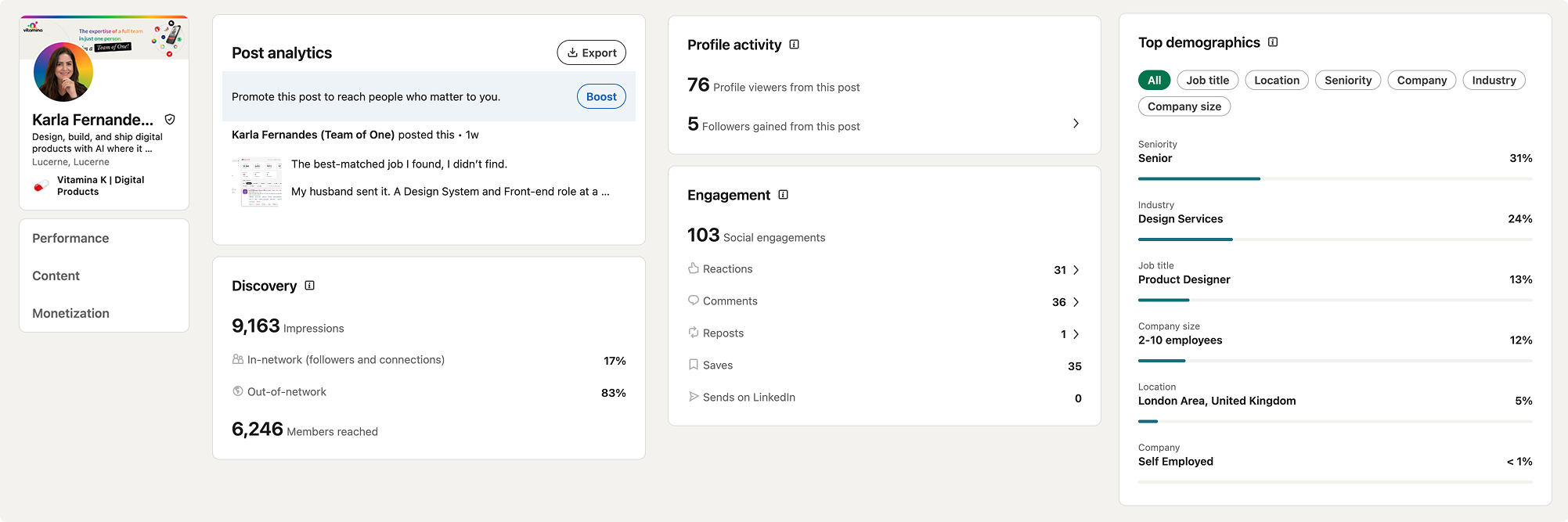
The LinkedIn post reached 6,246 people. 36 comments, 35 saves (more saves than reactions, which says "I want this, just not now"). I ran a free Hub Meet showing it live, and opened a paid two-hour workshop: "Build your own AI job-search agent", on a sliding scale of $59, $129 or $199.

Zero sign-ups. The workshop didn't run.

I turned the recording into a $5 package (recording, a 17-page ebook, a 28-page technical blueprint, a live Q&A) and invited over 2,000 people. 6 signed up.

What went wrong, once I looked honestly (with my coach and two community threads):

  • I sold the work, not the result. "Build your own agent" means two hours of setup to someone who's already tired. Job seekers want the short list, not the build.
  • The price came before the pitch. Luma shows the ticket price first, with no sales page in front of it.
  • Three tiers was too many, and "pay it forward" buyers are a different audience from job seekers.
  • The guide went out by DM, so I never captured a single email.
  • Setup was too hard. Even the 4 test users said installing it themselves wasn't easy.

That last one was the real answer.

LinkedIn analytics for the launch post: 9,163 impressions, 6,246 members reached, 31 reactions, 36 comments, 35 saves, 76 profile viewers

The launch post on LinkedIn: 6,246 people reached, 36 comments and 35 saves. Plenty of interest, no sign-ups.

08 — The Pivot

Designers didn't want an agent.
They wanted an app.

So I stopped teaching the build and shipped the product.

On November 20 I asked a simple question: could the Job Match code become a Mac app people just download, connect to their own AI and use? Yes. The app is a window around the same engine, not a rewrite.

Three days and 84 logged iterations later, it was signed, notarized by Apple and live.

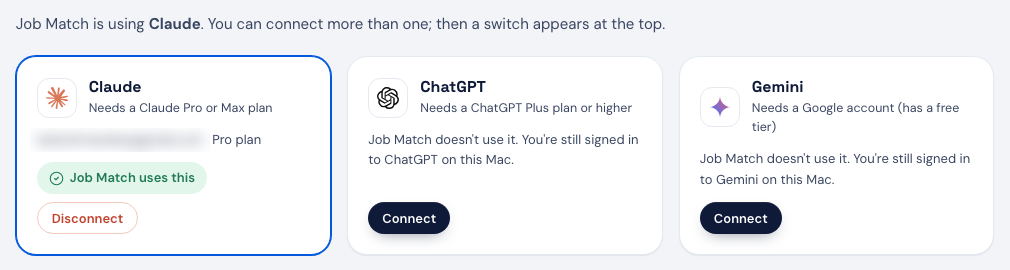
Connect your AI without Terminal. One page: Install, Sign in, Use this one. ChatGPT and Gemini install without Homebrew or Node, because non-technical buyers can't install developer tools.

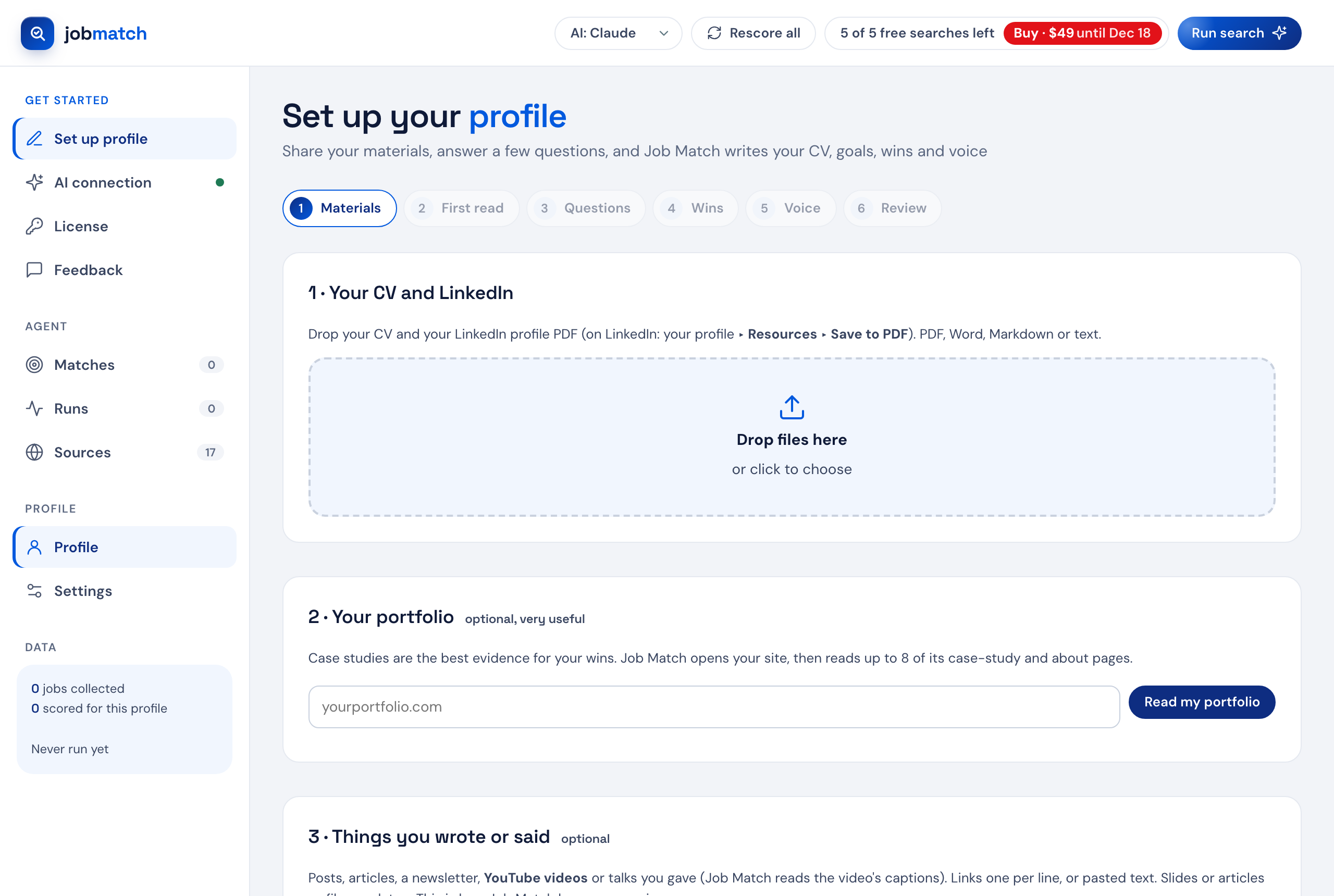
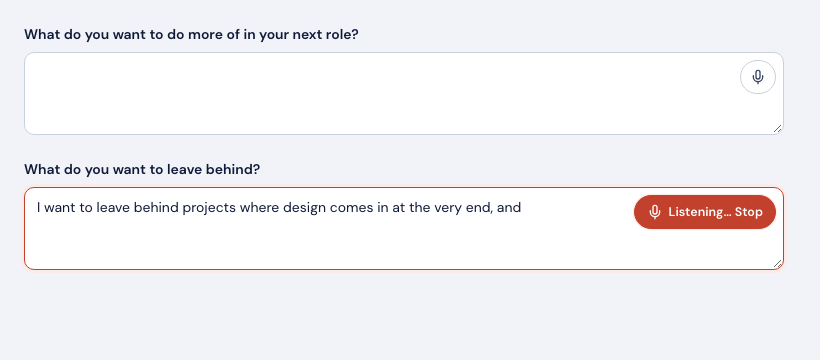
Set up your profile by talking. Upload your CV and LinkedIn PDF, answer only the questions still open, dictate instead of typing. The setup fills the same five profile files I use.

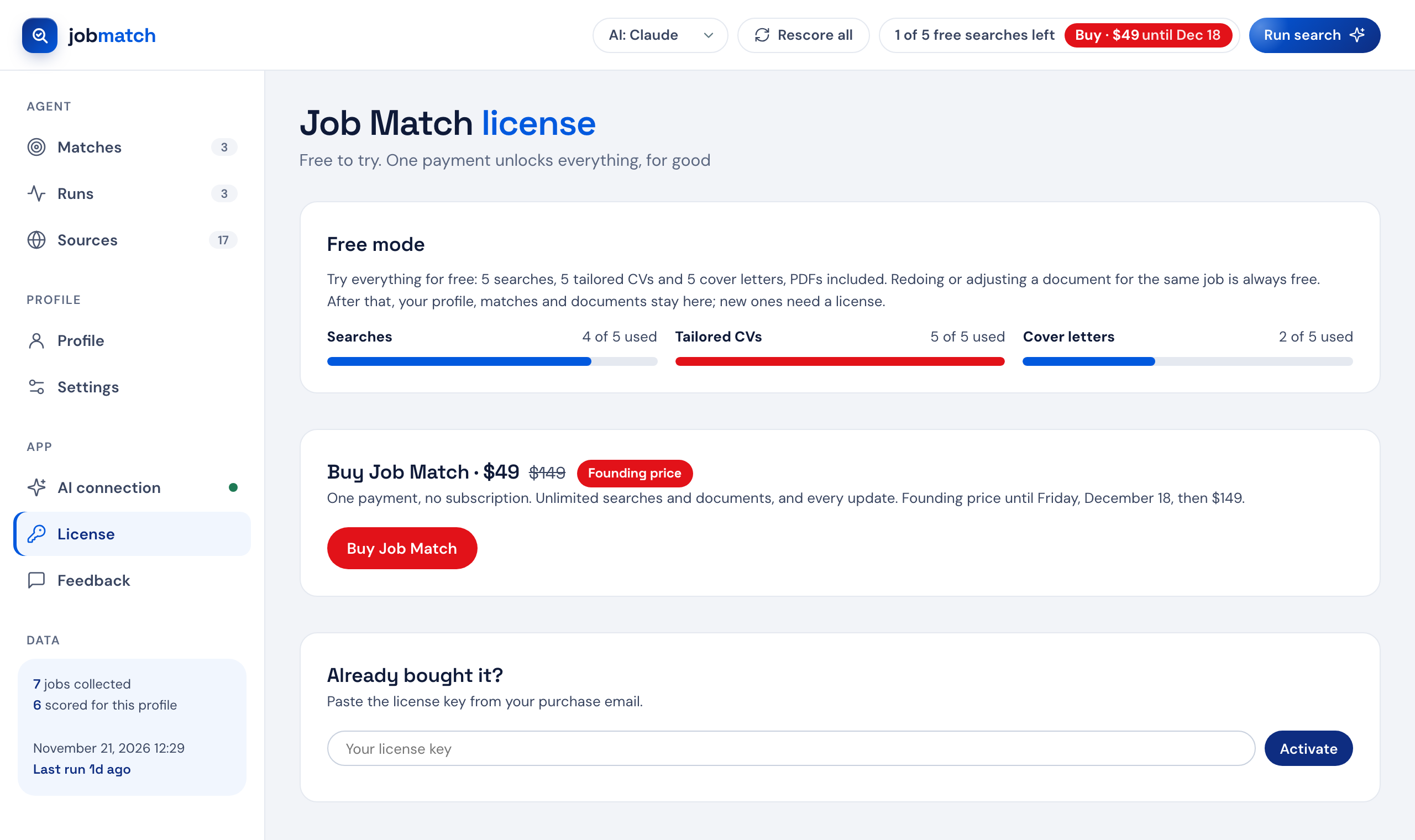
Free mode that doesn't punish you. 5 searches, 5 CVs, 5 cover letters. When they run out, everything you made stays. Only new searches need a license.

Not in the App Store, on purpose. Apple's sandbox doesn't let an app use the AI programs on your Mac. Apple still notarized it.

Profile setup for a new user in Job Match

Setup in the Mac app. Each screen replaces a step that stopped test users in the web version.

AI connection cards for Claude, ChatGPT and Gemini

Connect the AI you already pay for.

Dictation microphone, idle and listening

Answer by talking, with a clear listening state (the first version lost words).

09 — The Design System

35 colours became 20.
Contrast failures went to zero.

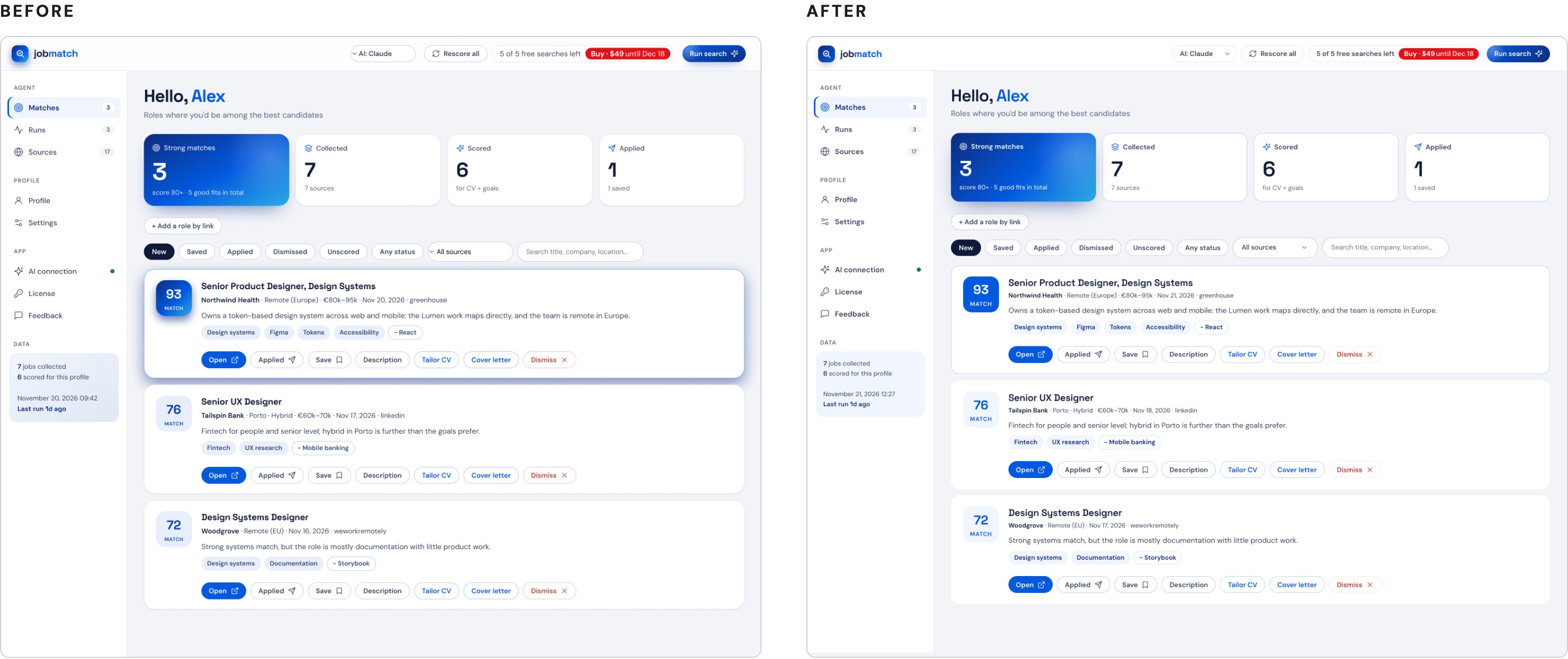
Building fast leaves marks. When I audited the app across 33 screens on demo data, it rendered 35 solid colours, 28 font sizes, 10 corner radius sizes, 13 shadows and 49 different control looks.

I built a design-system page that reads the app's own files every build (so it can't drift), then a Figma file with every screen, flow and edge case as editable layers. I proposed a smaller system, edited the proposal by hand in Figma ("less is more"), and applied it back to the app.

One rule now decides every shadow: a shadow means "this sits higher". Only three things qualify.

BeforeAfter
Solid colours3520
See-through colours51
Font sizes2817
Corner radius106
Shadows135
Contrast failures10
The Matches screen before and after the design system

Same screen, same demo data. Fewer decisions on screen means the score is the first thing you see.

10 — Shipping

The privacy check stopped my first release.
Good.

The first 1.0.0 build stopped at my own pre-release check: a stray settings file from a test was sitting inside the app. Harmless this time, but exactly the kind of thing that ends up on someone else's Mac.

So shipping got a gate. Before any release, a script checks the bundle (no personal files, no keys, no email), then drives every screen in 10 states on demo data and fails on any error. Only then: Developer ID signature, Apple notarization, publish.

The day after launch I shipped 1.0.1 to fix bullet lists breaking inside PDFs. Sparkle offered the update to everyone on 1.0.0 automatically.

On X I wrote: "15 years ago, I wished I had one iOS app. 3 years ago, I had 21 on the App Store and Play Store. Today, I shipped my first Mac app. I'm proud."

I still am.

License page in free mode: 4 of 5 searches, all 5 tailored CVs (in red) and 2 of 5 cover letters used, with the founding price offer

Free mode shows exactly what's left. A meter turns red only when it runs out, and everything you made stays.

The takeaway

13,204 jobs. 3 roles.
One strict judge.

I built it to stop missing jobs. It worked. Then I learned the harder lesson: people don't buy the thing you built. They buy what it gives them back (their evenings, mostly).

If I started again, I'd skip the workshop and ship the app first. I taught the build because that's what I know how to do. The people asking didn't want to learn it. They wanted the short list.

Let's solve the right problem first

You have a vision.
I can help build it. Let's talk.

Book a free 20-min chat → Or check other options →